You're looking at a website that has become harder to manage than the business it represents. A new service page needs a developer, product information lives in several places, and the next redesign feels risky because the current site is tied to everything behind it. For a Cincinnati business owner comparing web design, SEO, or digital marketing options, the core question isn't whether headless technology sounds modern. It's whether separating your content from your website will create enough business value to justify the added complexity.
What a Headless CMS Actually Means for Your Business
A headless CMS is a content management system that stores and organizes your content separately from the website or application that displays it. You still get an administrative dashboard where your team creates product descriptions, service pages, images, and other content, but the CMS doesn't control the visual design visitors see. Instead, it delivers that content through an API to whichever digital experience needs it.
Consider a vendor at Findlay Market. The business owner might want one product description to appear on the company website, an Instagram Shop listing, an in-store kiosk, and eventually a mobile ordering experience. A traditional CMS usually centers content around one website. A headless CMS treats the content as a reusable business asset that different channels can request and display.
That distinction affects everyday work. Your editor may update a product name or service description in one place, while developers maintain the website's layout independently. The content can remain useful even if the front end changes from a website to an app, digital sign, or customer portal. Bloomreach's explanation of headless CMS architecture describes this separation as a way to keep content management apart from page presentation.
The business problem behind the architecture
Headless CMS architecture emerged as an API-first approach in the mid-2000s. Cloud-native platforms helped it gain broader enterprise traction around 2013, and the phrase "headless CMS" became more widely used around 2015 as mobile-first design and JAMstack gained attention. A market snapshot cited by Hashmeta's headless CMS history and market overview places the global software market at about USD 816.9 million in 2024, with projections of roughly USD 3.94 billion in 2025 and USD 22.28 billion by 2034, based on a projected 22.6% CAGR.
Those figures describe market activity, not a reason for every local business to migrate. A Clifton restaurant with a menu, location page, hours, and contact form may not need multiple front ends. A growing service company with separate Cincinnati, Dayton, and Northern Kentucky experiences might benefit from structured content that can be reused without rebuilding every page manually.
Practical rule: Headless solves a content distribution and presentation problem. If your only problem is an outdated homepage, a simpler redesign may solve it more efficiently.
The rest of the decision comes down to fit. You'll need to weigh publishing flexibility, SEO control, editor usability, development access, and total cost against what your business plans to do next.
How a Headless CMS Works Behind the Scenes
Think of a headless CMS as a distribution warehouse rather than a complete storefront. The warehouse stores clearly labeled inventory, the loading dock sends the right box when someone requests it, and each storefront decides how to display what arrives.
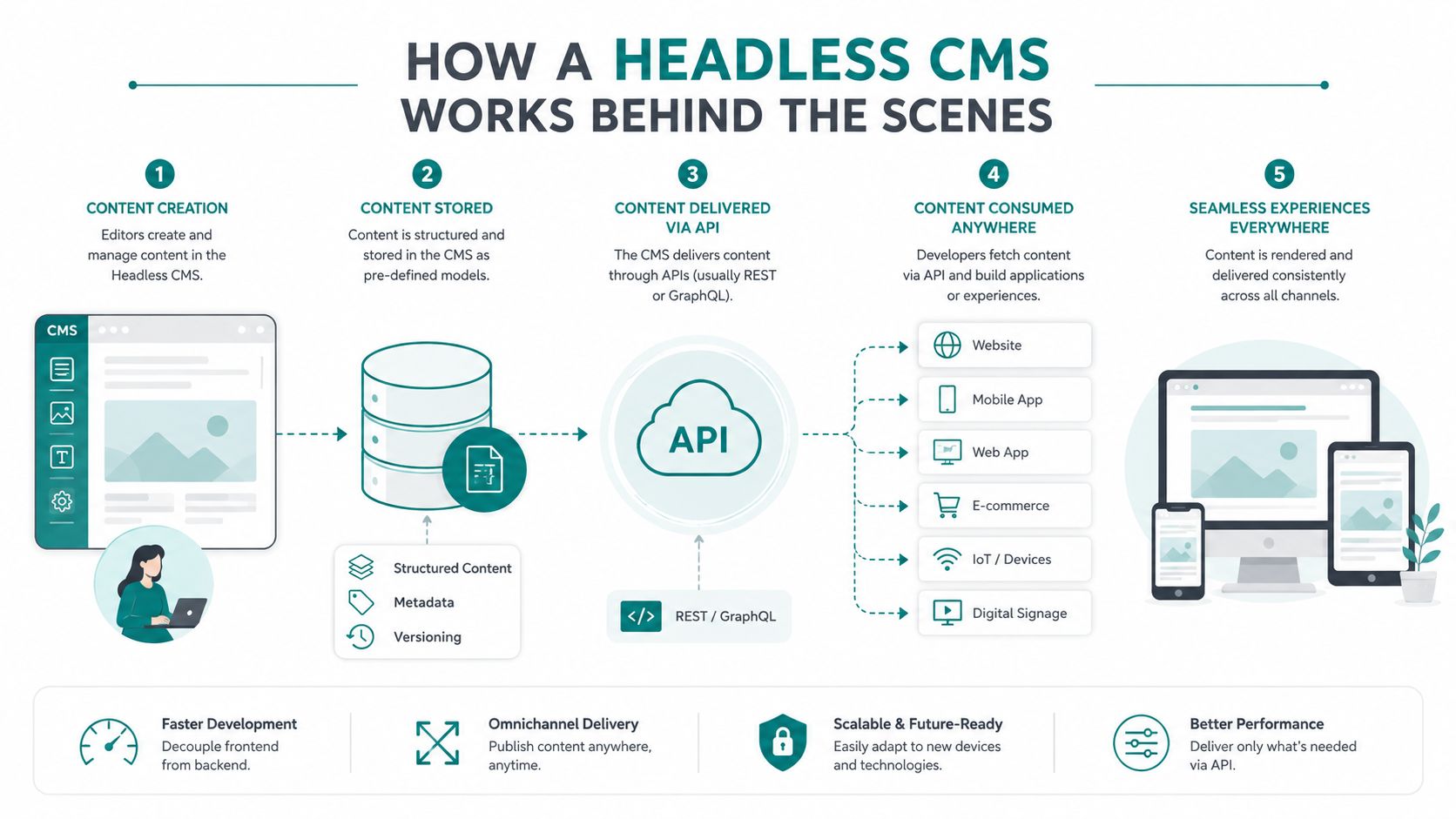
A headless system has three main parts:
- Content repository: Your team stores structured information here, such as a service, product, author, location, image, or promotion.
- API delivery layer: The API acts as the loading dock. It delivers requested content through technologies such as REST or GraphQL.
- Frontend applications: These are the customer-facing experiences, including a website, mobile app, digital sign, kiosk, or portal.
This headless architecture guide for enterprises provides useful additional context for teams evaluating how the separate layers fit into a larger digital system.
What happens when an editor publishes
Suppose someone on your team enters a new product description. The editor fills out defined fields in the CMS, such as product name, price, ingredients, image, and short description. A developer has already created the content model, which determines what information belongs in each field.
When the editor clicks publish, connected applications can request that content through the API. The website may display it as a product card, a point-of-sale system may use the product name, and a Google Shopping feed may receive the fields it needs. The content is entered once, but each channel controls its own presentation.
The front end still needs to be designed and built. Developers might use Next.js, Nuxt, React, or a static site generator to turn API-delivered content into pages and interfaces. The framework handles routing, layout, rendering, accessibility, and interactions. The CMS handles structured content and editorial management.
The Node.js versus React.js comparison from HDM can help nontechnical buyers understand why a project may use different technologies for server-side work and the customer-facing interface.
The separation gives each team clearer responsibilities. Marketers can manage approved content models, while developers can improve the interface without changing the underlying repository. A JAMstack-style setup may generate pages ahead of time and deliver them through a CDN, an approach associated with fast loading, straightforward scaling, and fewer public-facing runtime servers, as explained in this overview of headless CMS and JAMstack websites.
A short video can make the workflow easier to visualize:
<iframe width="100%" style="aspect-ratio: 16 / 9;" src="https://www.youtube.com/embed/SrxdBBmpsPU" frameborder="0" allow="autoplay; encrypted-media" allowfullscreen></iframe>Headless vs Traditional CMS Side by Side
A traditional CMS bundles content administration and website presentation into one system. WordPress, Wix, and Squarespace are familiar examples. You edit a page inside the platform, choose a theme or template, and the same system generally renders the page for visitors.
A headless CMS separates those responsibilities. Platforms such as Contentful, Sanity, Strapi, and Hygraph store structured content and expose it through APIs, while a developer builds the presentation layer separately.
| Factor | Traditional CMS (WordPress, Wix, Squarespace) | Headless CMS (Contentful, Sanity, Strapi, Hygraph) |
|---|---|---|
| Content storage | Stored with the website system and page structure | Stored as structured content, separate from presentation |
| Presentation layer | Built-in themes, templates, and page builders | Custom frontend built with a chosen framework |
| Editor workflow | Familiar visual editing and direct page previews | Structured fields, preview tools, and platform-specific workflows |
| Time to publish | Usually quick for simple page edits | Quick for content updates once workflows are configured |
| Developer involvement | Often limited for routine edits | Typically needed for setup, layouts, and front-end changes |
| Hosting flexibility | Commonly tied to the CMS hosting environment | Backend and frontend can be hosted and scaled separately |
| Cost structure | Lower initial complexity for straightforward sites | Higher implementation complexity, with separate services to manage |
| Scalability | Suitable for many small and medium websites | Strong fit for multiple channels, products, locations, or applications |
| Security surface | Website and administration commonly share one application | Separation can reduce direct exposure, but APIs and front ends still need protection |
| Best-fit business type | Brochure sites, local services, simple blogs, and small stores | Omnichannel brands, complex e-commerce, portals, apps, and multi-site organizations |
Which Cincinnati business fits each model
A Clifton restaurant with a menu, reservations, private-event information, and local search goals will often get more value from WordPress, Wix, or Squarespace. The owner can make common updates without maintaining a separate front end.
A Mason professional services firm may also prefer a traditional CMS if its website mainly supports lead generation through service pages, team biographies, resources, and contact forms. A strong content strategy and technical SEO implementation can matter more than architectural separation.
A West Chester e-commerce brand has a different decision. If product content must serve a storefront, mobile experience, campaign landing pages, and retail systems, headless architecture may justify its development investment. If the company only needs a well-run Shopify store with standard product pages, HDM's Shopify website development services may be a more direct path than introducing a separate CMS and custom front end.
The right choice isn't the platform with the most features. It's the platform that matches your publishing model, team capabilities, and growth plan.
Real Benefits and the Trade-Offs Nobody Talks About
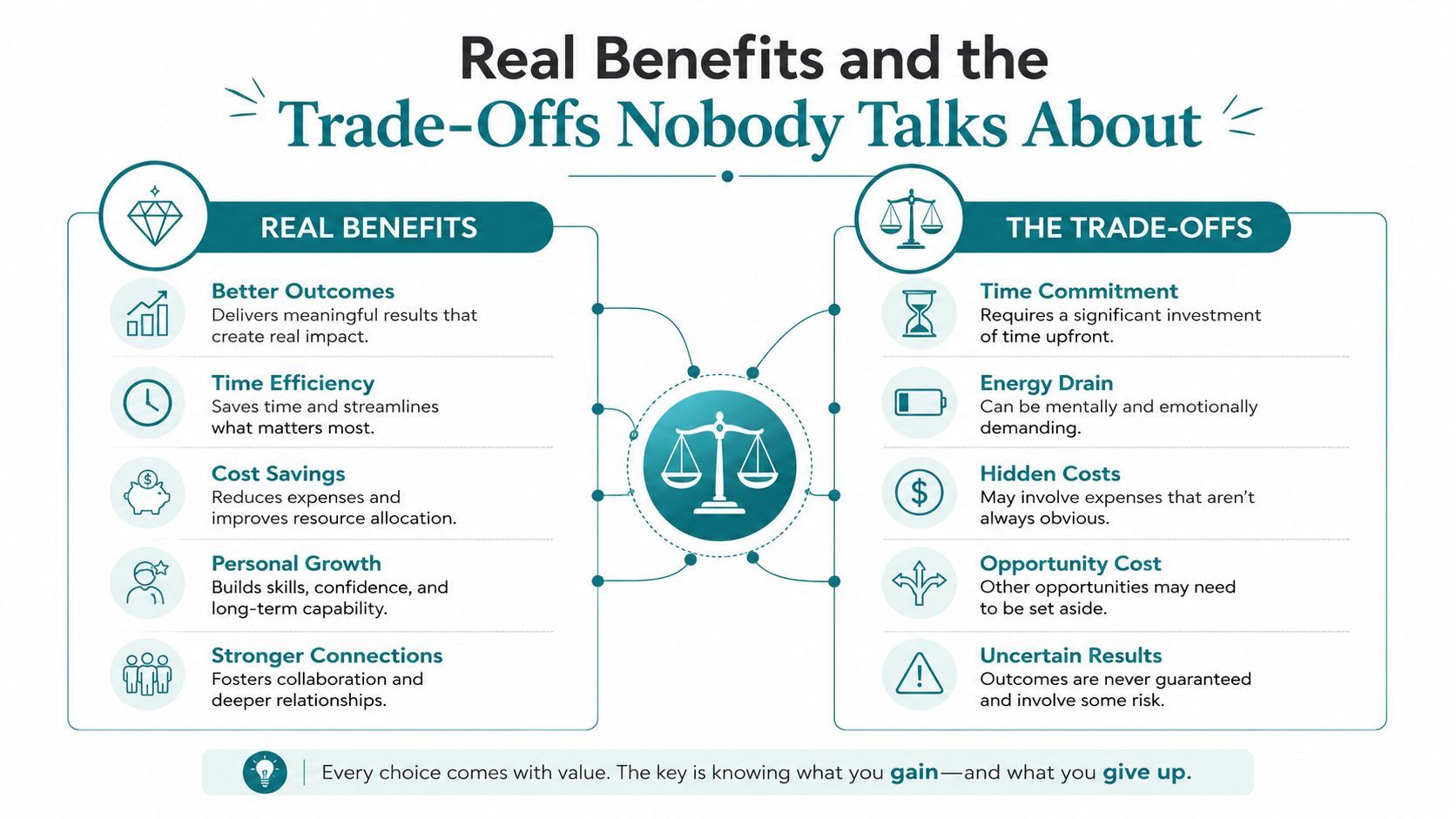
Headless architecture earns its keep when your business needs content flexibility and presentation control at the same time. A Cincinnati company may want one service description to support a website, a customer portal, an in-store screen, and an email campaign. A decoupled system can make that reuse more systematic than copying content between unrelated tools.
Performance can improve when developers control the front end and use appropriate rendering, caching, asset optimization, and CDN delivery. But the CMS itself isn't a magic speed button. A production headless e-commerce case study measured API response times alongside front-end metrics including Largest Contentful Paint and Interaction to Next Paint under baseline and simulated network conditions. Its central operational lesson is that front-end performance depends directly on API latency and network behavior, so cache strategy, endpoint efficiency, and the number of requests per page deserve careful attention, as shown in this production headless e-commerce performance study.
What owners usually gain
- Channel reuse: Editors can maintain structured product, service, location, or event content that multiple applications consume.
- Design freedom: Developers aren't restricted to the CMS's built-in theme system or page template logic.
- Independent changes: A redesign can change the presentation layer without forcing a complete rewrite of every content record.
- Growth support: New locations, service categories, microsites, and customer experiences can use the same content foundation.
- Technical SEO control: Developers can manage semantic markup, metadata, internal linking, rendering, and performance more precisely. A focused site architecture guide for SEO can help identify whether your current structure already supports those goals.
What gets harder
Editors may lose the familiar WYSIWYG experience. They might see fields and components instead of a page that looks exactly like the published result, unless the team implements visual editing and reliable previews.
Marketing teams can also become more dependent on developers for layout changes. A content editor may be able to update a headline, but creating a new landing-page pattern or changing a component's behavior still requires front-end work. That's why implementation quality matters as much as platform selection.
The cost structure changes, too. You're managing a content system and a presentation layer, which can mean separate hosting, monitoring, deployment, integrations, and maintenance responsibilities. Survey data summarized by Kontent.ai's State of Headless CMS resource identifies the main perceived drawbacks as missing marketing capabilities at 34%, reliance on developers at 33%, and lack of personalization at 32%.
A headless rebuild should improve the relationship between marketing and development, not simply move the bottleneck into a new dashboard.
Where Headless CMS Shines for Cincinnati Businesses
The strongest use cases involve businesses that need the same information to work in several environments or need front-end behavior that a traditional theme can't support cleanly.
A medical practice with several patient experiences
A Cincinnati medical practice may need a public website, provider profiles, treatment information, appointment content, and a patient portal. A structured CMS can separate reusable healthcare content from a front end designed for accessibility, performance, and the practice's compliance requirements. The implementation still needs careful handling of protected information. A CMS should not be treated as automatically suitable for regulated data just because it's headless.
A traditional CMS remains the sensible choice for a smaller practice with one marketing website, a few providers, and basic contact or appointment links. If the practice doesn't need a portal or multiple applications, the extra architecture may add expense without solving a meaningful problem.
A Blue Ash DTC brand with distributed product content
A consumer packaged goods brand shipping from a Blue Ash warehouse might manage product stories in a headless CMS while connecting commerce data from Shopify. The same structured content could support the main storefront, campaign pages, an Instagram Shop workflow, and other retail experiences. This arrangement keeps editorial storytelling separate from transactional product functions.
A traditional Shopify setup can still win when the catalog is modest, the storefront is the only important channel, and the team wants to launch without custom front-end development. Shopify's native ecosystem may cover the business's needs more easily.
A multi-location home services company
A home services company serving Cincinnati, Dayton, and Northern Kentucky may share core service descriptions while maintaining unique local introductions, service areas, team information, and calls to action. A structured model can help the company reuse approved service content without forcing every location page to become identical.
WordPress may be cheaper and easier for a company with only one service area or a small number of pages. A careful content template, local SEO process, and disciplined editorial workflow can provide sufficient control without a full decoupled rebuild.
A nonprofit with separate campaigns
A nonprofit might operate a primary donation website alongside an event microsite. Headless content can support shared campaign descriptions, sponsor information, speaker profiles, and calls to action across both experiences while allowing each front end to have its own design.
For a nonprofit with one annual event and a simple donation form, a traditional CMS with a reliable fundraising integration may be the better financial decision. Architecture should follow campaign complexity, not ambition alone.
Choosing a Vendor and Deciding If You Should Migrate
Start with the operating model, not the platform logo. Ask who will create content, who approves it, how many channels need the information, and who will maintain the front end after launch.
Evaluate the system your team will actually use
A hosted SaaS headless CMS can reduce infrastructure work because the provider manages the CMS environment. A self-hosted option may offer more control, but your team or development partner takes on more responsibility for updates, security, backups, and availability.
Look for content modeling flexibility. You should be able to represent the objects in your business, such as locations, services, products, providers, events, and related resources, without forcing editors to duplicate information.
Review API and webhook support before signing. Integrations with your CRM, e-commerce platform, analytics tools, search service, or marketing automation system may depend on how reliably the CMS can send and receive updates.
Nontechnical staff need more than a login. Check for:
- Role-based permissions: Editors should have access appropriate to their responsibilities.
- Preview and workflow tools: Teams need review stages and confidence about what will go live.
- Integration readiness: Confirm compatibility with existing CRM, e-commerce, analytics, and personalization tools.
- Regulated-industry support: A healthcare organization should evaluate HIPAA-readiness with its legal, security, and technology advisers.
- Partner availability: Consider whether qualified implementation support exists in the Cincinnati region.
- Three-year cost: Include development, hosting, licensing, integrations, maintenance, training, and migration work.
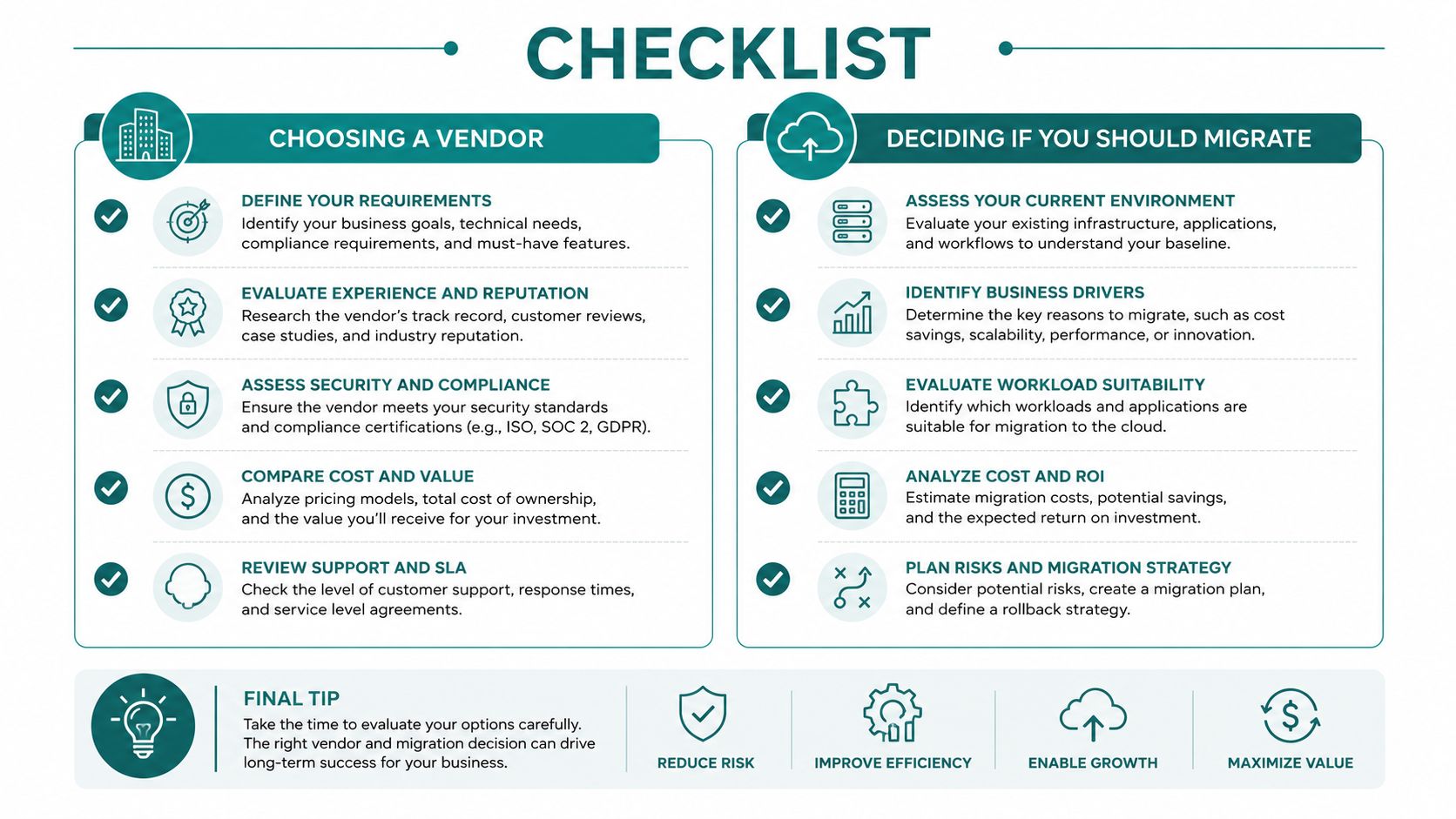
Use this migration screen
Check the statements that describe your business:
- Multiple channels: Your content must serve a website plus an app, kiosk, portal, store, or another destination.
- Developer access: You have internal developers or a dependable front-end partner.
- Content volume: Editors manage enough reusable content that duplication creates ongoing work.
- Growth plans: You expect significant changes in locations, services, products, brands, or digital experiences during the next 24 months.
- Front-end limitations: Your current CMS prevents the design, performance, or integration work your strategy requires.
- Workflow pressure: Marketing and development regularly block each other from publishing.
If two or more boxes are checked, a headless rebuild is worth pricing out. If fewer than two apply, improve the current WordPress, Shopify, Wix, or Squarespace setup first. That may mean better hosting, a cleaner content structure, fewer plugins, improved templates, stronger SEO foundations, or a more disciplined publishing workflow.
Your Decision Checklist and Common Questions Answered
Use this short review with your team this week. Don't ask whether headless is fashionable. Ask whether your business needs the capabilities below.
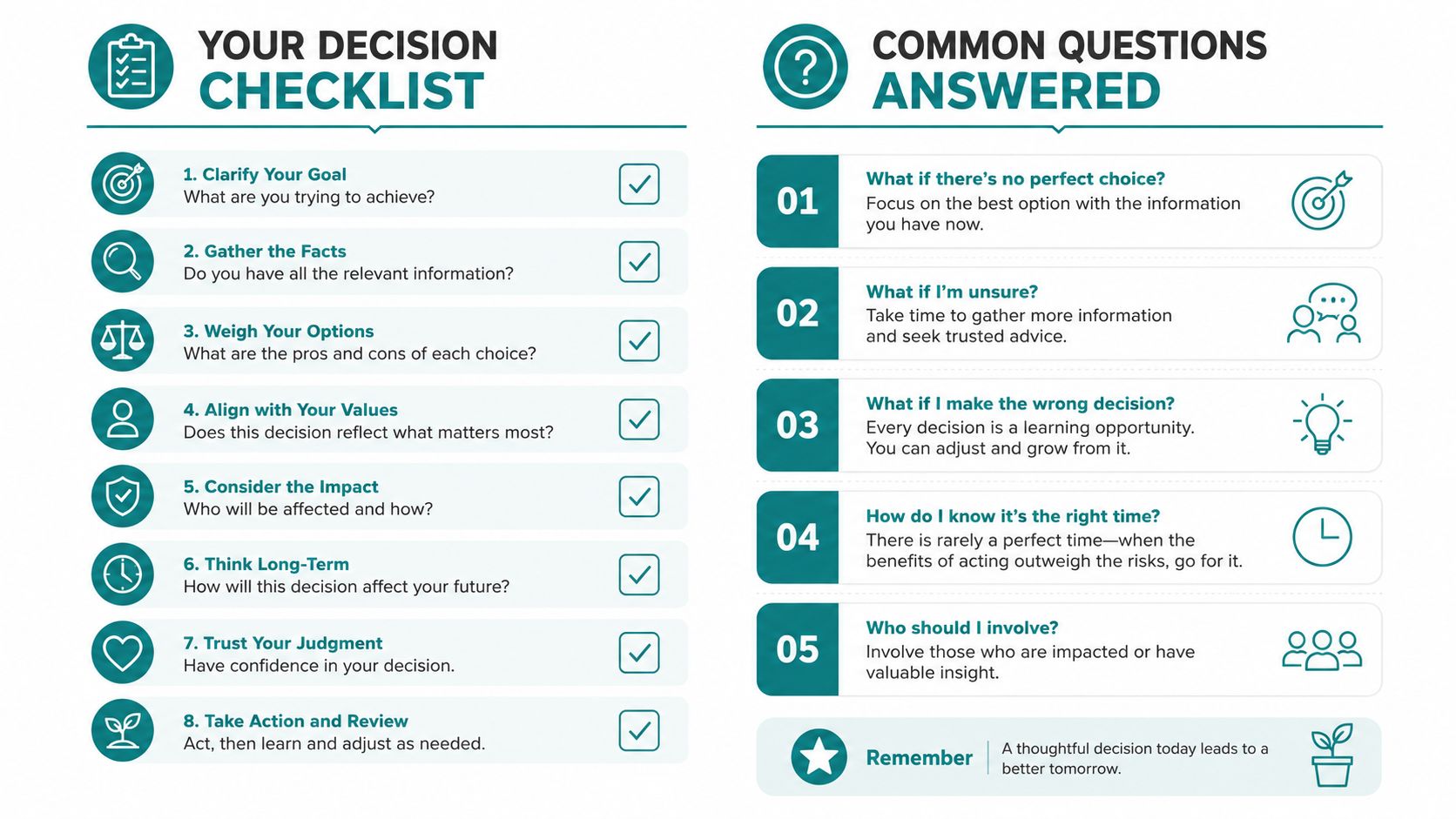
- Multiple destinations: Will content serve more than one important digital experience?
- Planned redesign: Are you preparing a redesign that shouldn't force a content rebuild?
- Reusable information: Do products, services, providers, locations, or events appear in multiple places?
- Front-end requirements: Do you need performance or interaction control beyond your current theme?
- Developer support: Can someone build, test, secure, and maintain the separate front end?
- Editorial workflow: Can your team work effectively with structured fields and previews?
- Growth direction: Will new channels, locations, products, or portals matter to the business soon?
Common questions
Who owns hosting? With a hosted headless CMS, the provider generally manages the CMS environment, while your development team or hosting partner may manage the front end. Confirm responsibilities for deployments, monitoring, backups, security, and support before signing.
Will headless improve SEO automatically? No. Headless gives developers more control, but implementation determines the result. Client-side rendering can create a serious SEO problem if search engines initially receive only an HTML shell instead of the page content. Use server-side rendering or static site generation where appropriate, and test crawlable HTML, metadata, canonical URLs, redirects, structured data, and internal links. The risk is outlined in this headless CMS SEO guide.
What will it cost? There isn't a responsible universal range. Cost depends on the CMS, front-end design, integrations, content migration, workflows, hosting, compliance needs, and ongoing support. Compare the complete three-year operating cost with the cost of improving your current platform.
How long does a rebuild take? The timeline depends on content volume, design complexity, integrations, approvals, migration quality, and testing. A small brochure site may not justify the process, while a multi-channel platform requires more planning and validation.
AI also changes the evaluation. A 2025 CMS survey reported that 44% of respondents wanted AI-powered content creation from their CMS, and 13% more respondents than in 2024 said AI capabilities were essential, according to Storyblok's State of CMS 2025 release. For a Covington retailer preparing to expand into Instagram Shopping or a Mason medical practice adding a patient portal, structured content may support future workflows. For a simple local brochure site, it may be unnecessary architecture.
If your checklist points toward headless, ask for an architecture audit before approving a rebuild. If it doesn't, stay with your current platform and invest in the fundamentals that affect leads, sales, and visibility.
HDM provides headless CMS development, custom web applications, e-commerce implementations, SEO, performance marketing, and ongoing website wellness support for businesses across Greater Cincinnati. Visit HDM to discuss whether a headless rebuild, a traditional CMS improvement plan, or a focused technical audit fits your next stage of growth.